Learning This Will 10x Your AI Productivity
If you want to stop repeating yourself to AI, start here.

Most people are wasting time asking AI to do the same thing over and over. And that’s because they interact with AI in the chat form factor: submit a request and get output in return.
That’s exactly what’s wrong. What if I told you that you only have to do something once, and then never do it again. How so?
Short answer: by systemizing your knowledge and workflows, so you never have to do it again.
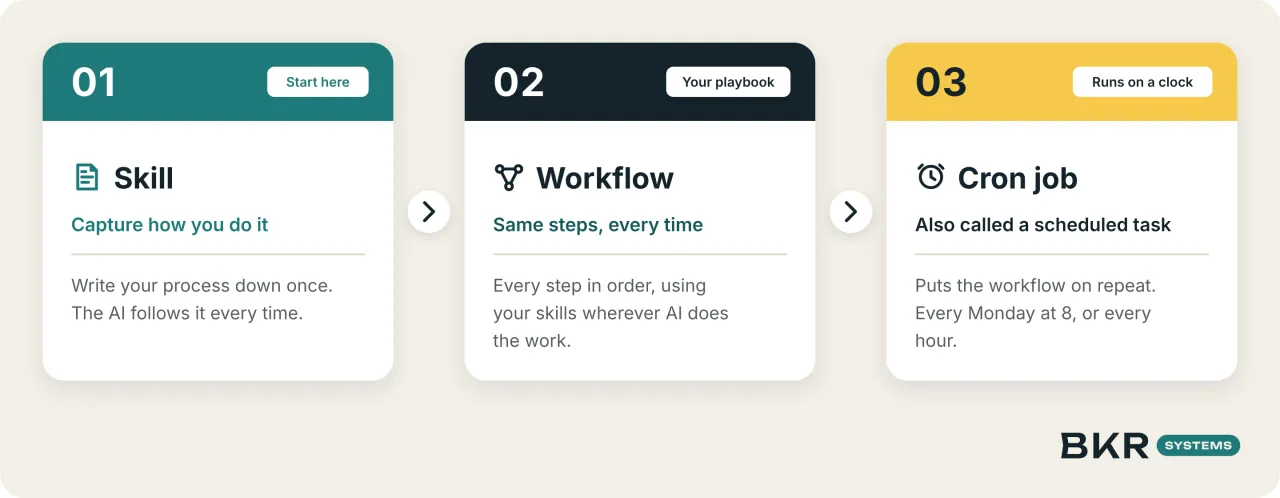
Cheat sheet
| Term | What it is | Think of it as |
|---|---|---|
| Skill | Saved instructions that teach AI one task, your way | Training for a new hire |
| Workflow | Every step in order, the same way every time, the more detailed, the more powerful | A recipe, a playbook |
| Cron job | Starts a workflow at a set time | Clocking in for work |
| Trigger | Starts a workflow when something happens | An alert on your phone |
| Deterministic | You set the steps. Same path every run. | A train on tracks |
| Agentic | The AI picks the next step | A taxi |
Build them in that order. Write the skill first, build the workflow around it, then put it on a schedule. Here is how the three fit together.
What is a skill?
A skill is a saved set of instructions that teaches AI how to do one task your way, every time.
Think about hiring someone new. They know how to work. They don’t know how you work. So you train them once. A skill is that training, written down for the AI: instructions and examples in a simple text file, plus any templates it needs.
Sounds too simple? Because it is. Knowledge and experience are nothing more than a text file, but they’re stored in a place where they’re much harder to share: your mind.
That is the problem.
Anthropic, the company behind Claude, puts it simply: "Skills load on demand, so you don't have to repeat the same guidance across conversations."
That is the difference between a skill and a prompt.
- A prompt lasts one chat, as you type the same thing for the one-thousandth time
- A skill comes back every time the job does, even after the person who wrote it leaves
What is a workflow?
A workflow is your playbook. Everything that you do to achieve a specific outcome from start to finish. This takes more creativity than you would imagine.
You need to sit down and outline every phase you enter, the tools you use, what to do when you get stuck or a problem arises. So it should be said that the more detailed the workflow, the better results you can expect.
This, however, is much different than a skill.
A skill is how one play gets run. Such as how you write a proposal, or the steps you take to format a PDF or slides.
The workflow is the whole system, the entire playbook: which skills to use, the tools to employ, and in what order. It combines all of your individual standards and processes into one flow to achieve a multi-step objective.
Some steps use AI, and those steps use your skills. Some steps are plain automation. Sort through the data. Export the file. Send the email.
#1: Linear workflow (lead capture)
A form comes in. AI sorts it. It lands in your CRM. Your team gets notified.
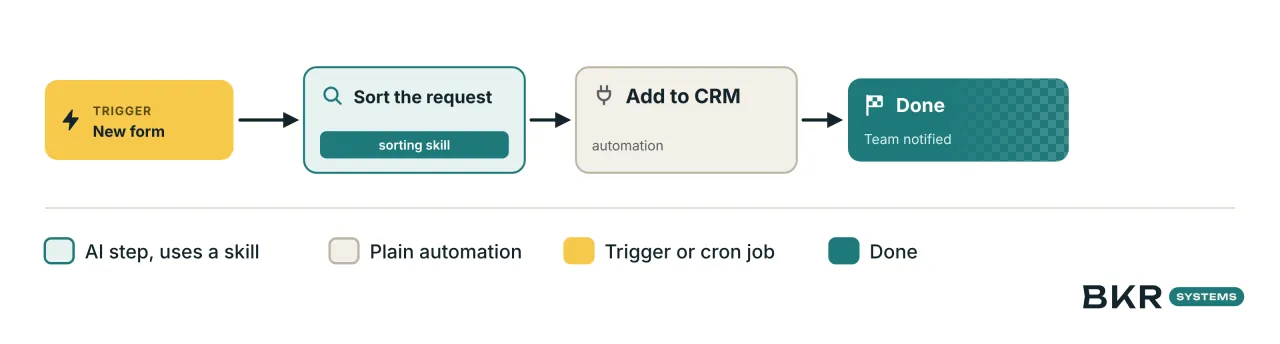
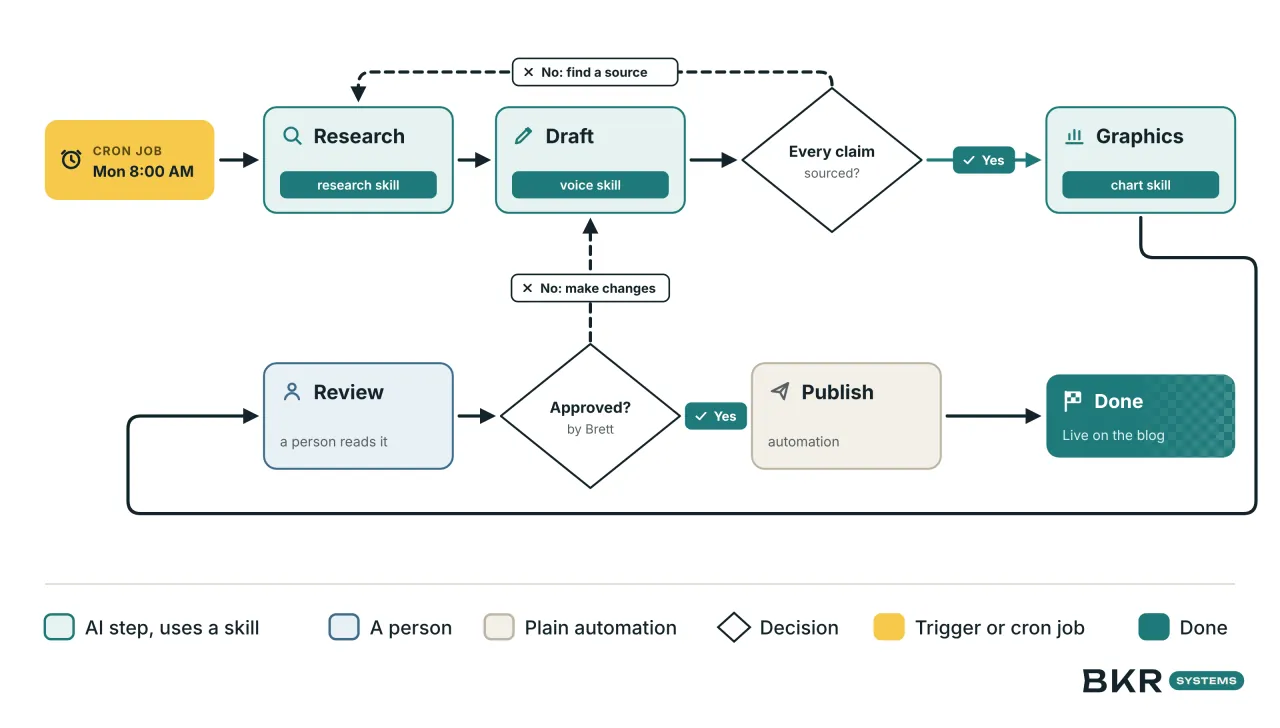
#2: Looping workflow (content production)
Most workflows loop back and wait for a person. A weekly blog post goes research, draft, check every claim, make the graphics, get approval, publish. If a check fails, it goes back a step. For each step, it uses the skills and tools you have outlined in the workflow.
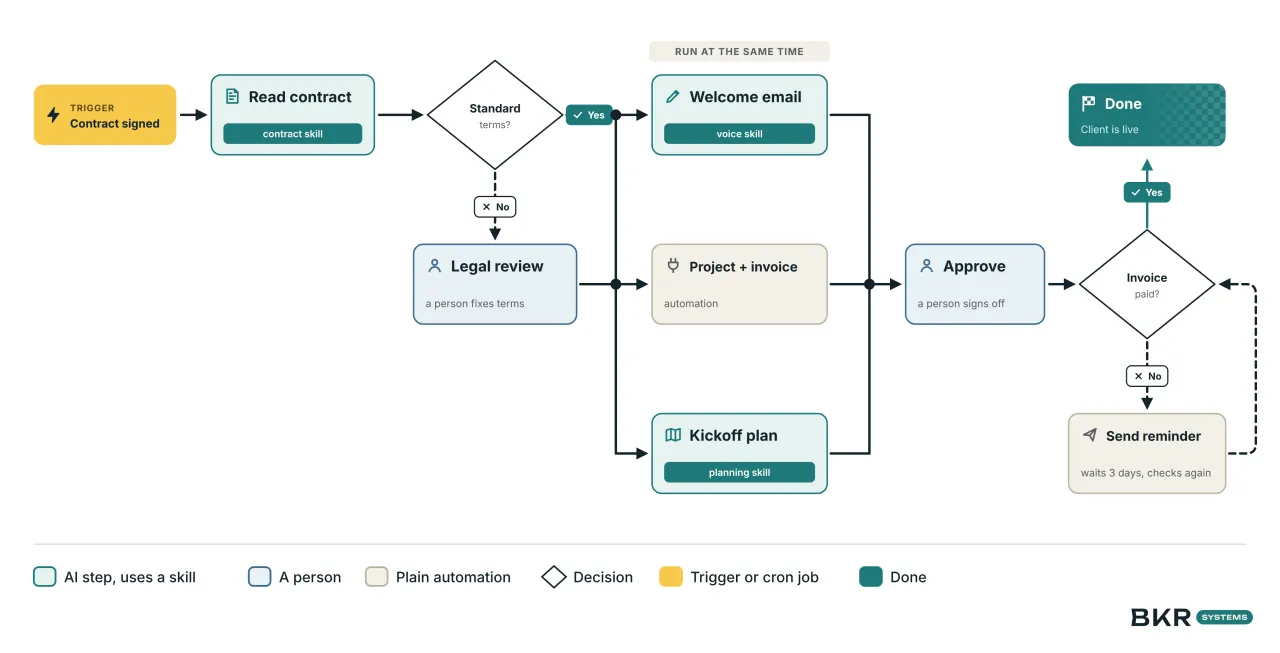
#3: Parallel workflow (client onboarding)
Client onboarding. AI reads the contract and flags odd terms for a person. Then the welcome email, the invoice, and the kickoff plan all run at the same time. If the invoice is not paid, a reminder goes out every three days.
Workflows like this should be built as your needs arise, and not before you have done this manually yourself. Nothing should be handed off to AI until you understand every step and minute detail to ensure you have quality output at scale.
Workflows can be either deterministic or agentic
What does that mean? Well, it comes down to one question: who decides the next step?
In a deterministic workflow, you do. The steps are set ahead of time. Think of a train on tracks. Same stops, same order.
In an agentic workflow, the AI does. You give it a goal and a set of tools, and it picks the route. Think of a taxi. It is still repeatable: same goal, same tools, same rules. Only the route changes.
The best workflows are a mix of the two, a deterministic playbook, with steps being agentic to allow for reasoning and prevent it from being too restricted to perform well.
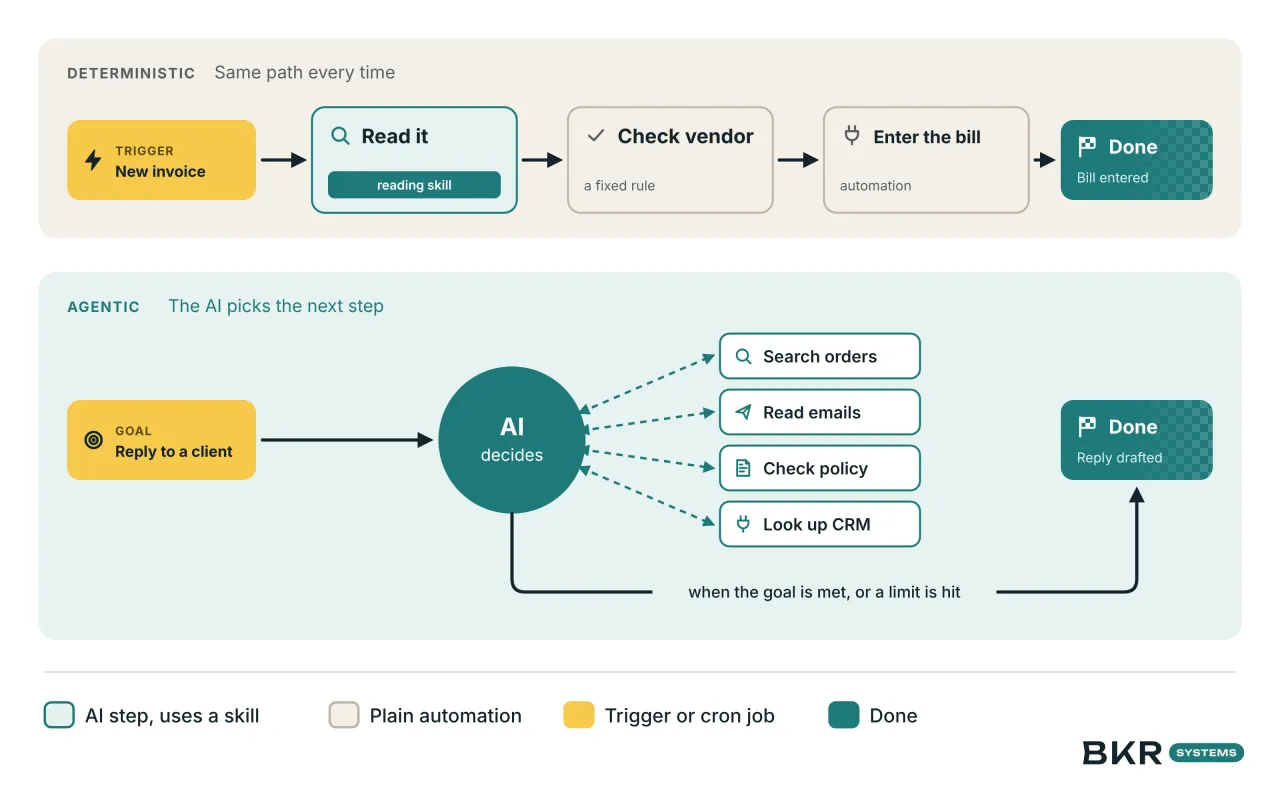
A deterministic workflow can still use AI, like reading a messy invoice. The AI just does not choose what happens next.
Start deterministic. Add an agentic step only where the job needs judgment.
What is a cron job?
A cron job is like your best employee clocking in for work. It starts a workflow at a set time. Every Monday at 8 AM. The first of the month.
This can also be referred to as a scheduled task. The name “cron job” comes from cron, the classic scheduler on Unix and Linux computers, built to "schedule periodic background work."
Does it need to run on an event instead of a clock? That is a trigger.
A trigger starts a workflow when something happens, like a new form or a missed payment.
Which one do you need?
- "How should this be done?" Write a skill.
- "What happens first, second, third?" Build a workflow.
- "Can I write every step down?" Keep it deterministic. If not, add an agentic step.
- "When should it run?" Schedule it, or trigger it.
How do you build your first one?
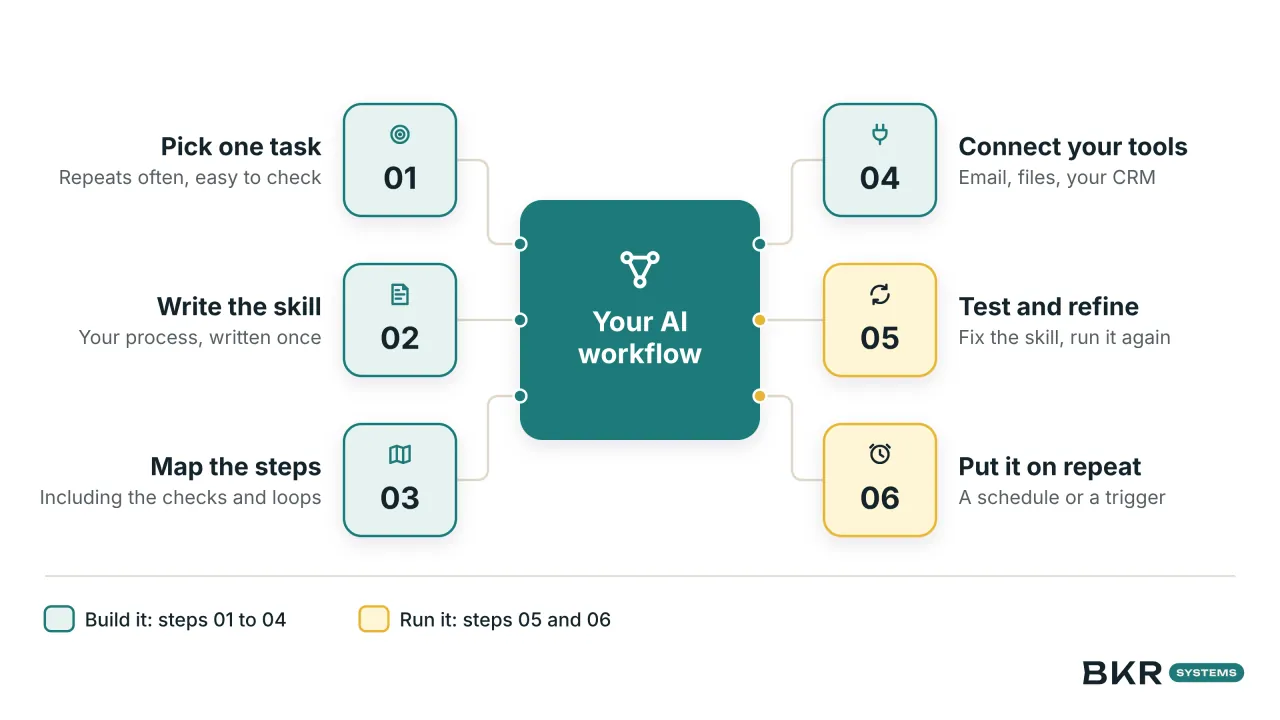
- Pick one task. It repeats often and is easy to check.
- Write the skill. Your process, written down once.
- Map the steps. Checks and loops included.
- Connect your tools. Email, files, calendar, your CRM.
- Test and refine. When the AI misses, fix the skill, not the chat (continuously improve).
- Put it on repeat. A cron job or a trigger.
Most of the work happens before you automate anything.
I say this a lot:
The goal should be to do the monotonous, menial, tedious work in great detail, documenting every step and decision, so you'll never have to do it again. That will 10x your AI productivity.
Frequently asked questions
What is the difference between a skill and a workflow?
A skill is how one task gets done. A workflow is every step in order, run the same way every time. One workflow can use many skills.
Is a playbook the same as a skill?
Close, but not quite. A skill is one play. Your playbook is the workflow that runs every play in order.
Is a cron job the same as a scheduled task?
Yes, for most people. Cron is the classic scheduler, and most AI tools call the same idea a scheduled task. Both start a workflow at a set time.
Do I need an AI agent, or is a workflow enough?
For most tasks, a workflow is enough. Add an agentic step only when the next step depends on what the AI finds. However, the goal long-term should be to implement all workflows into a much larger AI system.
Where should I start?
Pick one task that repeats often and is easy to check. Write the skill for it first.
If you want your skills, workflows, and schedules set up for your business, our AI Enablement work covers custom agents, workflow automations, and hands-on workshops. Tell us what you want to run on autopilot.
Thanks for reading,
Brett Booker